
Azure VPN PPS Limit: Complete Troubleshooting Guide
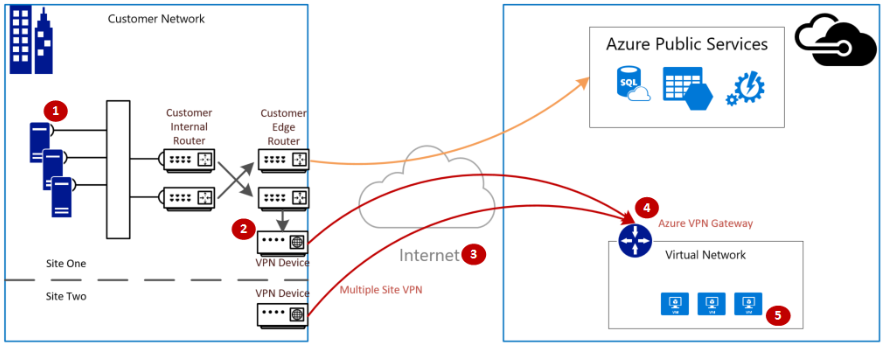
We recently encountered VPN Traffic Issue due to Azure VPN PPS limit – all on-premises users were unable to establish a connection to the Azure cloud via the existing Site-to-Site (S2S) setup.
Summary of Checks Performed – Azure VPN PPS Limit
The investigation confirmed that the following potential causes were not observed:
- Microsoft support confirmed that the Azure VPN traffic issue was unrelated to maintenance or backend failures.
- No service health alerts were reported.
- No recent changes were implemented on the system.
- No modifications were made to the VPN GW subnet UDR.
- The UDR already contain the necessary subnets.
Steps for Issue Initiation:
Monitoring of the Site-to-Site (S2S) VPN Gateway and its connections has been initiated.
Problem Statement for Azure VPN PPS Limit
- Initial Check: The VPN Gateway (GW) resource health was initially checked and reported as healthy, with no degradation identified.
- Connection Status: However, the connection associated with the VPN GW was found to be unstable, frequently dropping every few minutes.
- Traffic Analysis: Data In and Data Out metrics showed a sudden and significant spike in traffic initiated from the on-premises network.
Root Cause Verification:
The timestamp of the traffic spike was checked for a potential Distributed Denial of Service (DDoS) attack. It was confirmed that the spike was not a DDoS attack, but rather a bulk migration upload that started simultaneously.
- This Azure VPN traffic issue was initially suspected to be due to PPS throttling.
- Critical Metric Identified: A critical metric, Packets Per Second (PPS), was checked and found to be exceeding 66K
- Limitation Identified: The existing VPN GW was identified as Generation 1 VpnGw2 with Algorithms used (VPN Connection) AES256 & SHA256, which has a lower PPS limit of 61k. The high PPS was saturating the gateway’s capacity.
Resolution :
The issue was resolved by migrating the VPN Gateway from Generation 1 VpnGw2 to Generation 2 VpnGw3AZ Algorithms used (VPN Connection) GCMAES256, which supports a significantly higher PPS capacity of 140k, with significant Throughput increased from 1.2 to 1.5 Gbps
Migration Steps:
Decommissioning Old Components:
- Deleted the current VPN connections.
- Deleted the current VPN GW (This step was quick).
- Deployment of New Gateway:
- Created a new VPN GW of type Generation 2 VPNAZ3.
- This process took a standard 45 minutes and created a new Public IP (PIP) for the gateway.
- Created new connections associated with this new VPN GW
- Configuration and Verification:
- The connection came up successfully, and traffic flow returned to normal levels
- Configured the Site-to-Site (S2S) connection using the new gateway details.
Note:
- You must also reconfigure your VPN device and P2S clients.
- You should reconfigure the S2S tunnel configuration with the new VPN GW public IP address
Recommended Fixes for Azure VPN PPS Limit
To prevent this Azure VPN traffic issue from recurring, we implemented better gateway monitoring and alerting.
- Alerts based on Packets Per Second (PPS).
- Alerts on the health of the VPN Gateway resource.
FAQ
What is the implication if my VPN connection uses the default IPsec/IKE policy settings rather than a custom configuration with specific Phase 1 and Phase 2 settings?
When the Azure VPN connection uses the “Default” IPsec/IKE policy, the following occurs:
- Azure’s Proposal: Azure sends a set of proposals, typically including combinations like AES256/SHA256, and often GCMAES if the gateway supports it.
- Negotiation: The actual cryptographic algorithm negotiated is determined by what your on-premises device supports and prefers.
- Performance Impact (Gen 2 VpnGw3AZ Reference): The real packet-per-second (PPS) limit aligns with the negotiated algorithm:
- GCMAES256 Negotiated: If your on-premises device supports and negotiates GCMAES256, aim for a reference performance of approximately ~140k PPS/tunnel.
Default AES256/SHA256 Negotiated: If the negotiation results in the more common “default-ish” AES256/SHA256, plan for a performance of around ~66k PPS/tunnel.
When is it necessary to choose between upgrading an existing VPN Gateway and deleting and then recreating it?
| Starting SKU | Target SKU | Eligible for SKU upgrade | Delete/Recreate only |
|---|---|---|---|
| Basic SKU | Any other SKU | No | Yes |
| Generation 1 SKU | Generation 1 AZ SKU | Yes | No |
| Generation 1 SKU | Generation 2 AZ SKU | No | Yes |
| Generation 2 SKU | Generation 2 AZ SKU | Yes | No |
| Generation 2 SKU | Generation 1 AZ SKU | No | Yes |
What is the scheduled downtime?
VpnGw1 to VpnGw1az within same Generation:
You can modify the SKU within the Azure portal without any service interruption; this typically takes about 45 minutes. This is possible because VpnGw1AZ is the availability zone-enabled equivalent of VpnGw1, belonging to the same generation.
To move from Generation 1 to Generation 2
We must delete the existing VPN Gateway and all its associated components, and then create new ones.
Within the same Generations?
You can easily upgrade a SKU within the same Generation via the Azure portal, PowerShell, or Azure CLI. (Note: You cannot upgrade a Basic SKU; you must delete and recreate the gateway.) Upgrading a SKU preserves the public IP address, eliminating the need to reconfigure your VPN device or P2S clients.
Why is it not possible to have both a VPN Gateway Generation 1 and a VPN Gateway Generation 2 deployed simultaneously?
You are prevented from deploying two VPN Gateways of the same type (Site-to-Site, S2S) within the same GatewaySubnet. However, it is permissible to host two different types of VPN Gateways, such as a Site-to-Site (S2S) VPN Gateway and an ExpressRoute Gateway, within the same GatewaySubnet.
Reference
- Azure VPN GW PPS limit
- Migrating VPNG Generation 1 to Generation 2
- A virtual network can have two virtual network gateways: one VPN GW of type S2S and another of type Express route
- Microsoft official guide on VPN Gateway performance