
Azure AKS FailedScheduling – Kubernetes scheduler failure Insufficient CPU
Table of Contents
Problem Statement:
- We recently encountered an issue involving pods remaining in a pending state.
- Azure AKS FailedScheduling
Get Pending Pods Details:
kubectl get pods --field-selector status.phase=PendingYou can refer to my earlier blog for more essential kubectl commands documented here
Troubleshooting and Resolution Steps for AKS FailedScheduling
- We describe the pending pods and found the error below;
Warning FailedScheduling default-scheduler 0/34 nodes are available: 1 Too many pods, 1 node(s) had untolerated taint {store: true}, 3 node(s) had untolerated taint {CriticalAddonsOnly: true}, 30 Insufficient cpu. preemption: 0/34 nodes are available: 4 Preemption is not helpful for scheduling, 30 No preemption victims found for incoming pod.
Let’s break down the above error:
a. default-scheduler 0/34 nodes are available:
This indicates that the AKS scheduler was unable to find any available Nodes among the 34 it scanned to accommodate the pods, primarily because of insufficient CPU resources.
b. 1 Too many pods
1 Node identified with too many pods
(You can find the pods per node using the below Kubectl command)
az aks show --resource-group myResourceGroup --name myAKSCluster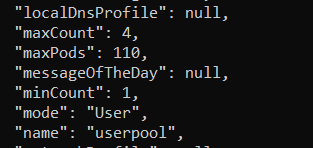
c. 1 node(s) had untolerated taint {store: true}, 3 node(s) had untolerated taint {CriticalAddonsOnly: true}, 30 Insufficient cpu
The pod could not be scheduled by AKS onto the system or storage nodepools because the target node is tainted, and the pod lacks the necessary toleration.
d. preemption: 0/34 nodes are available: 4 Preemption is not helpful for scheduling, 30 No preemption victims found for incoming pod.
AKS tried to evict low priority pods but couldn’t find any
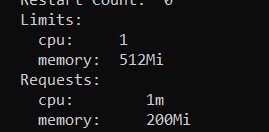
- When we describe the pending Pods, we discovered that the pod is requesting 1 Cores or 1000 mi (milli cores)
- What do the nodes say on CPU
- Check on which nodes the pending Pod is trying to deploy using the below command
kubectl get po -n pets -0 wide
- Describe the Node and check the “Alocatable CPU” and Request CPU as shown below


Final Outcome: (7820-7070 =750 Millicores are available) – Insufficient CPU
The Pod CPU is requesting 1 core or 1000 Millicores, but the Node can only accommodate 750 Millicores. Hence, we see an Insufficient CPU issue.
Solution:
Therefore, the following options are available to resolve this issue:
- Clean up pods that are not required
- Increase the node count
We’ll see how we can address this by increasing the node counts
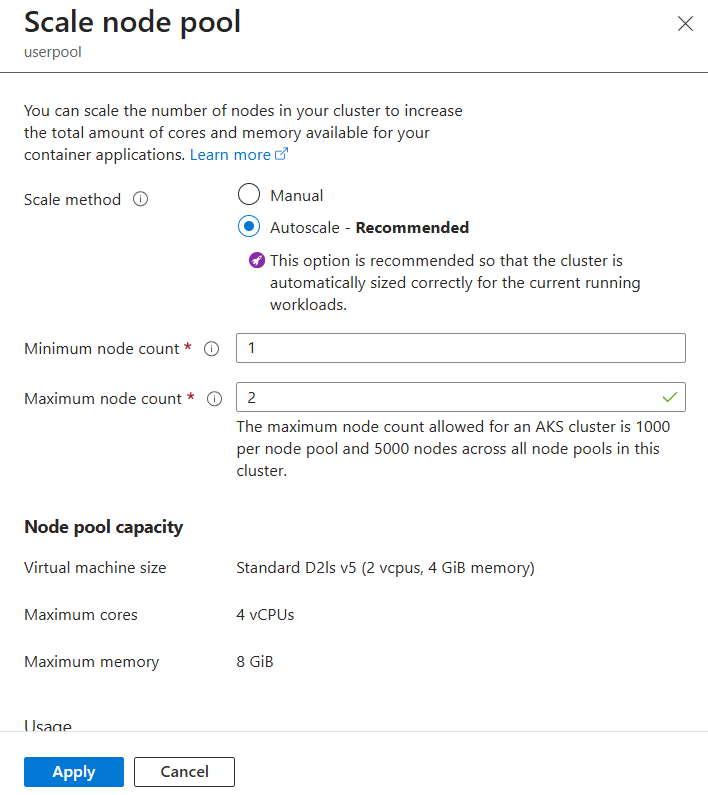
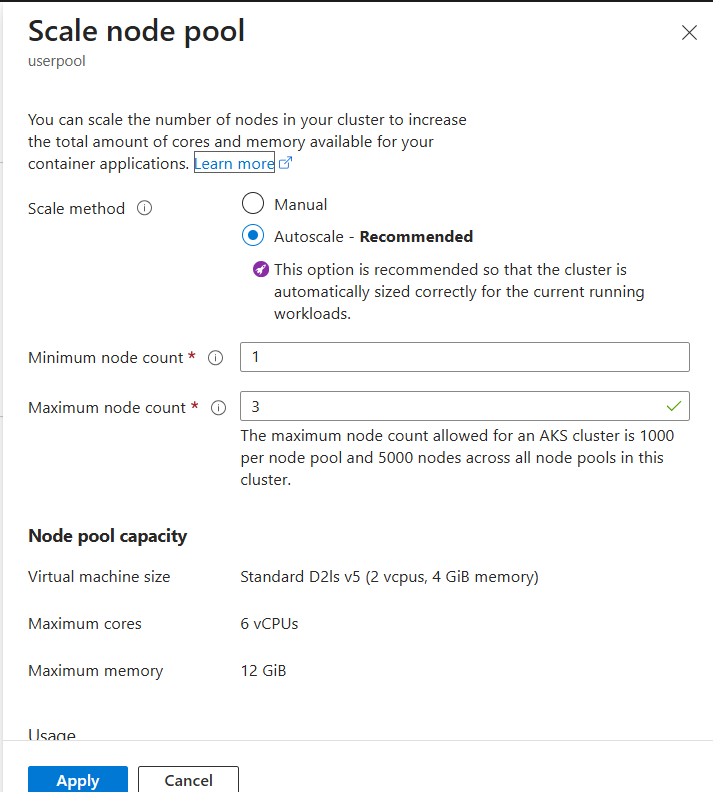
- Increase the Nodes on existing Autoscaler enabled at cluster level (Using Portal)
Current:
After Change:
- Increase the Nodes on existing Autoscaler enabled at NodePool level (Using CLI)
az aks nodepool update --resource-group <rsg_name> --cluster-name <cluster_name> --name userpool --update-cluster-autoscaler --min-count 1 --max-count 4Note:
- If the current maximum node count is 30 and you intend to add 4 more nodes, the new maximum count (max-count) must be set to 34, NOT 4.
- The above change is non-destructive (No downtime is required).
Additional Info:
Scale vs Update commands
- Avoid using direct scaling commands (e.g., scale) if Autoscaler is already enabled. Executing these commands will override the Autoscaler, changing the scaling mode to Manual.
- To adjust node counts when Autoscaler is active, utilise the Update command or the management Portal. This ensures the Autoscaler settings are maintained.
References:
- Use the cluster autoscaler in Azure Kubernetes Service (AKS)
- Scale a node pool automatically with the cluster autoscaler
- Manually scale the node count in an Azure Kubernetes Service (AKS) cluster