
2 Powerful Ways to Scale AKS Deployment to Zero With or Without HPA
Table of Contents
Running Kubernetes workloads continuously is not always necessary. Development environments, test services, background processors, scheduled workloads, and event driven applications may sit idle for hours while their pods continue consuming cluster resources.
A common requirement is simple:
- How can I scale an Azure Kubernetes Service deployment to zero replicas and bring it back when required?
- During database maintenance, I need to scale my Pods to zero to ensure they are disconnected. How can I achieve this to prevent any logs or incidents from being triggered during this period?
There are following main approaches:
- Manual scaling without Horizontal Pod Autoscaler
- Scaling with Horizontal Pod Autoscaler using external or object metrics
The correct option depends on whether the application needs to start automatically when new work arrives.
Scale AKS Deployment to Zero: Understand the Main Problem
Scaling a Deployment from one or more replicas down to zero is easy.
The difficult part is scaling it back from zero automatically.
A normal Horizontal Pod Autoscaler commonly uses processor or memory utilization from running pods. If the Deployment has zero running pods, there is no pod processor or memory utilization to measure.
This creates the central scale from zero problem.
Kubernetes 1.36 improves this area by continuing development of Horizontal Pod Autoscaler scale to zero support for Object and External metrics (Not applicable for CPU, RAM or custom metrics). However, the feature is Alpha and disabled by default. It is controlled by the HPAScaleToZero feature gate. It is not a general replacement for an event source or activation mechanism.
Option 1: Scale an AKS Deployment to Zero Without HPA
If automatic scaling is not required, the simplest approach is to scale the Deployment manually.
- First, check the existing Deployment:
kubectl get deploy -n Pets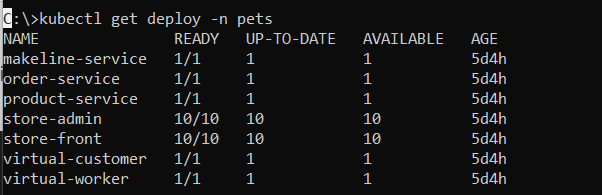
2. Scale the Deployment to zero:
kubectl scale deployment myapp --replicas=0
3. Verify the Deployment:
kubectl get deployment myapp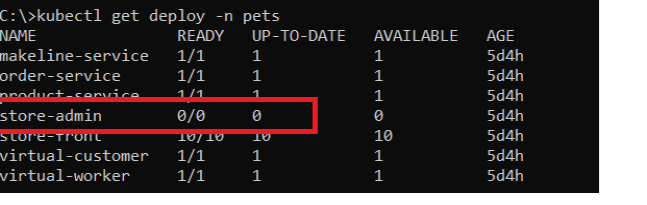
4. Verify that no application pods remain:
kubectl get pods5. To start the application again:
kubectl scale deployment myapp --replicas=1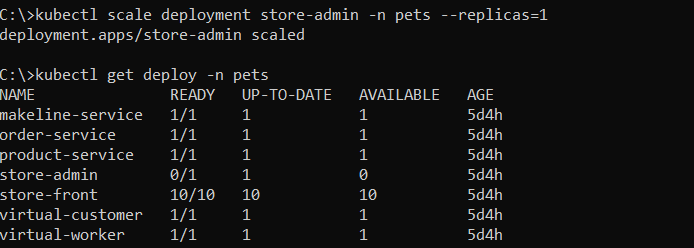
This method is suitable for development environments, temporary shutdowns, maintenance windows, demonstrations, and applications that do not need automatic activation.
Important limitation
If a Horizontal Pod Autoscaler manages the Deployment, manual scaling may not produce the expected long term result.
Check whether an autoscaler exists:
kubectl get hpaInspect it:
kubectl describe hpa myapp-hpaIf the autoscaler has a minimum replica count of one, it can return the Deployment to at least one replica.
Option 2: Scale to Zero When HPA Exists
A traditional Horizontal Pod Autoscaler is designed to adjust replica counts based on observed metrics.
A typical processor based configuration looks like this:
apiVersion: autoscaling/v2
kind: HorizontalPodAutoscaler
metadata:
  name: store-admin-hpa
  namespace: pets
  resourceVersion: "283928"
  uid: 669dc750-90c9-4555-9771-7d3fe9a5ff0f
spec:
  behavior:
    scaleDown:
      policies:
      - periodSeconds: 60
        type: Percent
        value: 10
      selectPolicy: Max
      stabilizationWindowSeconds: 300
    scaleUp:
      policies:
      - periodSeconds: 15
        type: Percent
        value: 100
      selectPolicy: Max
      stabilizationWindowSeconds: 0
  maxReplicas: 10
  metrics:
  - resource:
      name: cpu
      target:
        averageUtilization: 75
        type: Utilization
    type: Resource
  - resource:
      name: memory
      target:
        averageUtilization: 80
        type: Utilization
    type: Resource
  minReplicas: 2
  scaleTargetRef:
    apiVersion: apps/v1
    kind: Deployment
    name: store-admin
status:
  conditions:
  - lastTransitionTime: "2026-06-30T16:21:57Z"
    message: recommended size matches current size
    reason: ReadyForNewScale
    status: "True"
    type: AbleToScale
  - lastTransitionTime: "2026-07-05T15:11:11Z"
    message: the HPA was able to successfully calculate a replica count from cpu resource
      utilization (percentage of request)
    reason: ValidMetricFound
    status: "True"
    type: ScalingActive
  - lastTransitionTime: "2026-07-05T15:09:10Z"
    message: the desired count is within the acceptable range
    reason: DesiredWithinRange
    status: "False"
    type: ScalingLimited
  currentMetrics:
  - resource:
      current:
        averageUtilization: 100
        averageValue: 1m
      name: cpu
    type: Resource
  - resource:
      current:
        averageUtilization: 2
        averageValue: 4220Ki
      name: memory
    type: Resource
  currentReplicas: 3
  desiredReplicas: 3
lastScaleTime: "2026-07-05T15:11:11Z"The important setting is:
minReplicas: 2With this configuration, the autoscaler maintains at least two replica.
For a temporary shutdown, one practical approach is to remove the autoscaler and scale the Deployment to zero:
Before deleting the autoscaler, export its configuration if it is not already managed through source control or infrastructure automation:
kubectl get hpa myapp-hpa -o yaml > myapp-hpa-backup.yaml
kubectl delete hpa myapp-hpa
Then:
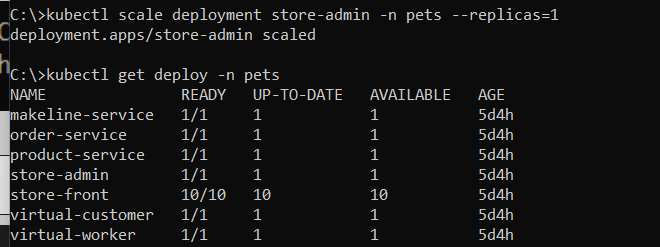
kubectl scale deployment myapp --replicas=0
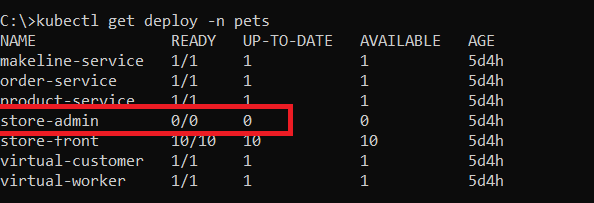
To restore it later:
kubectl apply -f myapp-hpa-backup.yaml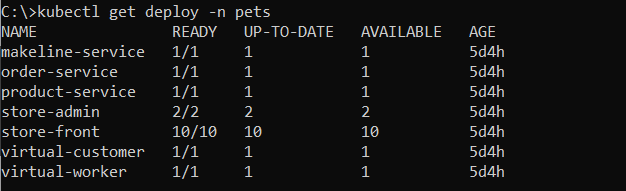
This is operationally simple, but it is not the preferred method for applications that need automatic activation.
References
- HPA scale to zero for custom metrics
- Scaling Down to Zero in Kubernetes: Exploring HPA and Ecosystem Solutions
My Previous Blogs
- Create a Private Azure Kubernetes Service (AKS) Cluster – Part 1
- Azure AKS Networking Explained: Azure CNI Overlay vs Node Subnet vs Pod Subnet – Part 1
- Azure AKS FailedScheduling – Kubernetes Scheduler Failure (Insufficient CPU)
- Kubectl Cheat Sheet – 41 Unique Kubernetes Commands Every Admin Should Know
- Istio in AKS Deployment: Ingress vs Gateway API, Managed vs Self-Managed – Part 1