
3 Proven Fixes for Azure Web App Container Not Starting & Deployment Slot Routing Errors
Table of Contents
Deploying containers to Azure App Service should be seamless, but often, the “Azure Web App Container not starting” error or “Errors routing requests to application container” during a slot swap can bring your CI/CD pipeline to a halt.
In this guide, we’ll walk through the exact steps to diagnose and resolve these issues using Azure Resource Health and specific environment variables.
Phase 1: Diagnosing the Startup Failure – Azure Web App Container not starting
Before changing settings, you need to see what’s happening inside the container.
The Diagnostic Path:
- Navigate to the Azure Portal and select your Web App.
- On the left menu, go to Diagnose and solve problems.
- Select Availability and Performance → Web App Troubleshooter.
- Check the Container Logs.
The Common Culprit: In our case, the logs showed the app starting successfully and connecting to Redis, but it was listening on the wrong address: Now listening on: http://[::]:*. This indicates a port mismatch between what Azure expects and what the container is providing.
Detailed Troubleshooting Analysis:
Site failed to startup after 1800.0138893 secIt Means…..Azure waited 30 minutes (1800 seconds) for the container to become “ready”, Azure never received a successful readiness signalAzure then killed the container and marked it unhealthy
Now listening on: http://[::]:*
Application started. Press Ctrl+C to shut down.
Hosting environment: Integration
Content root path: /app
This Confirms that, the container starts. The application boots successfully. The web server binds to a port. No crash, no exception, no OOM. So this is not; Dockerfile issue, Startup command issue, Image pull issue
Now listening on: http://[::]:*What this means..Azure App Service does NOT probe arbitrary ports. App listens on port 80, OR App listens on port defined by WEBSITES_PORT, OR App responds correctly to Health Check path. If Azure cannot connect → it assumes startup failure.
Phase 2: Fixing the Container Startup (Port Mapping)
Azure App Service defaults to port 80. If your .NET core app or custom container listens elsewhere, the platform’s health check will fail, and it will kill the container.
Step-by-Step Configuration
To fix this, you must explicitly tell Azure which port to use by updating the Environment Variables (Settings → Configuration → Application Settings):
- WEBSITES_PORT: Set this to
80. This tells Azure to route traffic to port 80 inside your container.

- ASPNETCORE_URLS: Set this to
http://0.0.0.0:80.Note: Using0.0.0.0is critical because it tells the app to listen on all available network interfaces, not just localhost, which is required for container networking.

Adjusting the Container Timeout
If your app has a heavy startup (e.g., initializing Redis or large DB migrations), the default 230-second timeout might be too short.
- Add/Update: WEBSITES_CONTAINER_START_TIME_LIMIT.
- Value: Increase this to 400 or 600 (seconds).
- Restart the Web App to apply changes.
Phase 3: Optimizing the Health Check Path
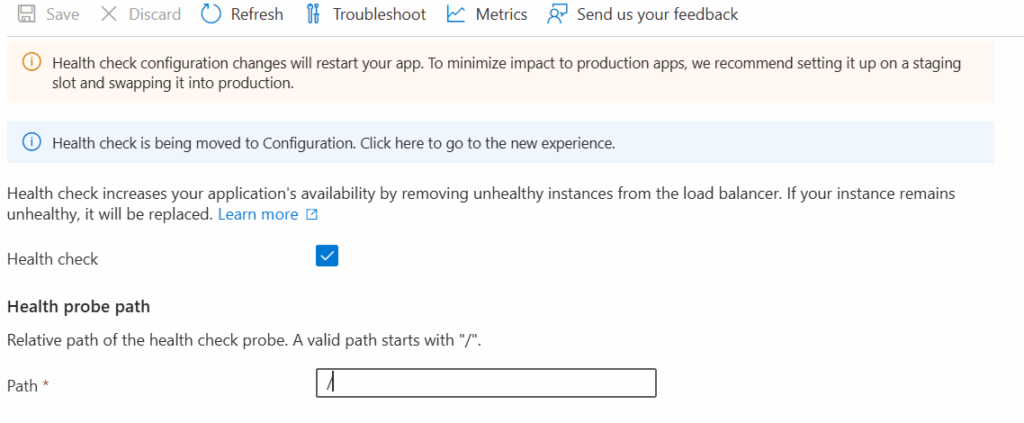
By default, Azure App Service attempts to “ping” the root path (/) of your application to see if it is alive. While this works for simple sites, it often causes issues for modern APIs or containers.
The Change: Moving from /health to /
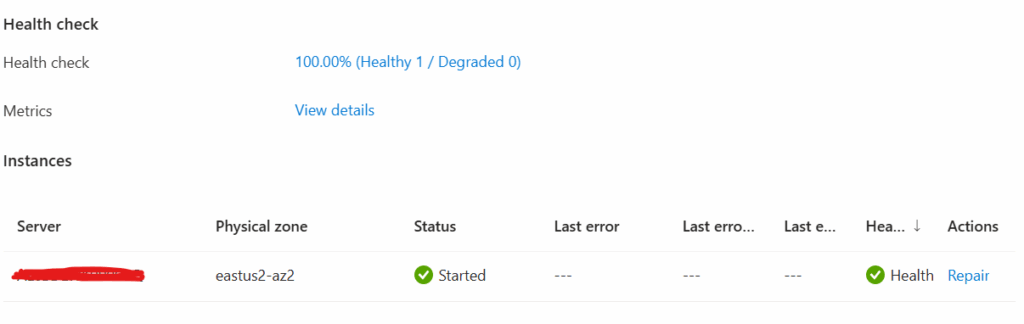
In the Azure Portal, navigate to Monitoring → Health check (or via Application Settings using WEBSITE_SWAP_WARMUP_PING_PATH). We updated the path from the default /health to /
Phase 4: Resolving Deployment Slot Swap Errors
A common error during a swap from Staging to Production is:
“Errors routing requests to application container”

This happens because Azure attempts to swap the traffic before the container in the target slot is fully “warmed up.” The platform thinks the container is “up” because the process started, but the application logic isn’t ready to handle requests yet.
The Solution: Warmup Pings
Add these settings to both Production and Staging slots to ensure a smooth transition:
- WEBSITE_SWAP_WARMUP_PING_PATH: Set to
/health(or your app’s health check endpoint). Azure will hit this path to verify readiness.

- WEBSITE_SWAP_WARMUP_PING_STATUSES:
- The Change: We removed/deleted the value
200from this setting. - Why? By default, Azure is satisfied with any response. When you explicitly set it to
200, the swap will strictly fail if it receives anything else (like a 202 or 302). However, as discussed in How to debug Azure app service slot swap failure, if your app has complex redirects or specific initialization codes, a strict “200” requirement can cause the swap to hang or fail unnecessarily. Deleting it allows Azure to use its default logic, which is often more resilient during complex container boots.
- The Change: We removed/deleted the value
Find out More
My previous blogs;
- 2026 Proven Guide: Azure SPN Secret Expiry with Automation & Graph API
- https://www.makcloudhance.com/2026-proven-guide-spn-secret-expiry-automation/
- AKS Private Cluster: Create a Private Azure Kubernetes Service (AKS) Cluster – Part 1
- https://www.makcloudhance.com/configure-aks-private-cluster/
- Azure AKS Networking Explained: Critical Differences Between Azure CNI Overlay vs Node Subnet vs Pod Subnet – Part 1
- https://www.makcloudhance.com/azure-cni-overlay-vs-node-subnet-vs-pod-subnet/
- Azure AKS FailedScheduling – Kubernetes Scheduler Failure Insufficient CPU
- https://www.makcloudhance.com/azure-aks-failedscheduling-insufficient-cpu/
- Kubectl Cheat Sheet – 41 Unique Kubernetes Commands Every Admin Should Know – Part 1
- https://www.makcloudhance.com/kubectl-cheat-sheet/
- Azure VPN PPS Limit: Complete Troubleshooting Guide
- https://www.makcloudhance.com/azure-vpn-pps-limit/
- How to Safely Disable SAS Key Access in Azure Storage Accounts (Covering Real-World Scenarios) – Part 1
- https://www.makcloudhance.com/disable-sas-key-access-in-azure-storage-accounts-part-1/
- How to Safely Disable SAS Key Access in Azure Storage Accounts (Covering Real-World Scenarios) – Part 2
- https://www.makcloudhance.com/disable-sas-key-access-in-azure-storage-accounts-part-2/
References
- Set up staging environments in Azure App Service (Deployment Slots)
- Monitor the health of App Service instances (Health Check)
- Troubleshooting failed slot swaps on App Service Linux
- How to debug Azure App Service slot swap failure
- Azure App Service warm‑up ping path not being called
- Azure App Service – Auto‑Heal vs Health Check
- A subtle gotcha with Azure Deployment Slots and ASP.NET Core
- Warming up an Azure App Service slot before swapping
- Unable to leverage WEBSITE_SWAP_WARMUP_PING_STATUSES