
Azure AKS Networking Explained: Critical Differences Between Azure CNI Overlay vs Node Subnet vs Pod Subnet – Part 1
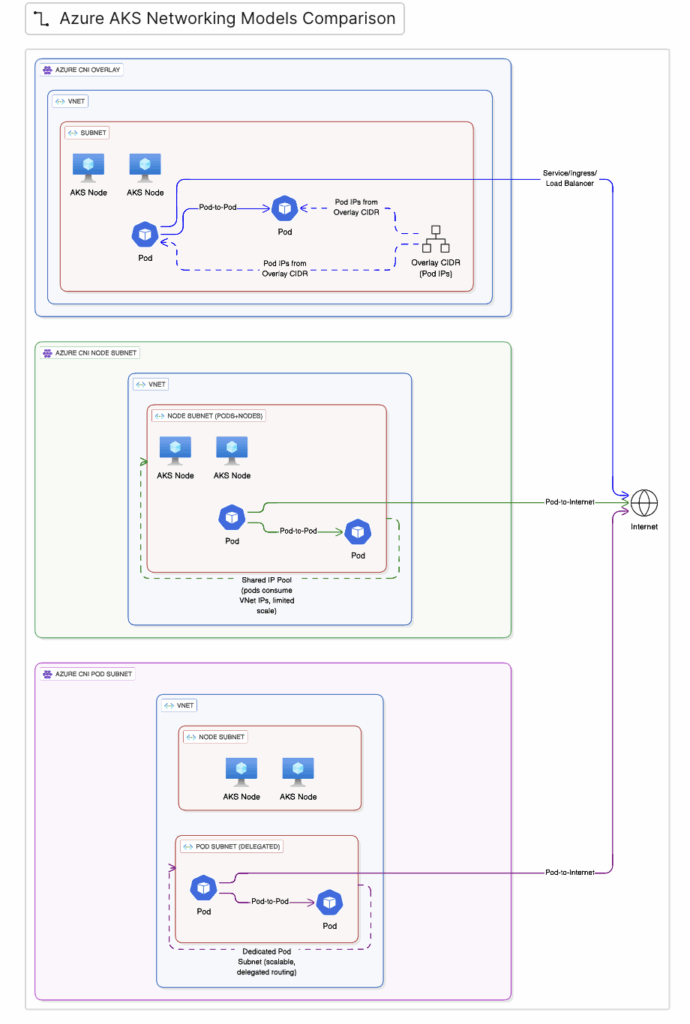
Understanding Azure AKS networking and how pod IPs are allocated, routed, and consumed in each Azure AKS networking model helps architects avoid IP exhaustion, complex routing, and scaling bottlenecks. By selecting the right Azure AKS networking approach—whether Azure CNI Overlay, Node Subnet, or Pod Subnet—teams can design AKS clusters that scale efficiently and remain operationally stable.
Table of Contents
Comparing Networking models between Azure CNI Overlay vs Node Subnet vs Pod Subnet
| Feature | Azure CNI Node Subnet | Azure CNI Pod Subnet | Azure CNI Overlay |
| Overview | Nodes get IP address from → VNet subnet Pods get IP address from → same subnet as nodes No pod subnet separation | Nodes get IP address from → VNet subnet Pods get IP address from → separate Pod subnet Separate pod subnet | Nodes get IP address from → VNet subnet Pods get IP address from → separate private CIDR range Separate pod private internal CIDR range |
| Type | Flat Network (legecy) | Flat Network | Over Network |
| Deployment | Can be deployed using Azure Portal, CLI and Terraform | Can be deployed only via CLI and Terraform | Can be deployed using Azure Portal, CLI and Terraform For bring our own CIDR, we can only deploy using CLI and Terraform |
| Connectivity | Pods can be connected directly from outside On-prem, Express route/VPM | Pods can be connected directly from outside On-prem, Express route/VPM | Because pods do not have real VNet IPs:On-prem systems cannot directly reach pod IPsYou must use:Kubernetes ServiceLoadBalancerIngress |
Deployment of Azure CNI Overlay vs Azure CNI Node Subnet vs Pod Subnet Networking Model’s:
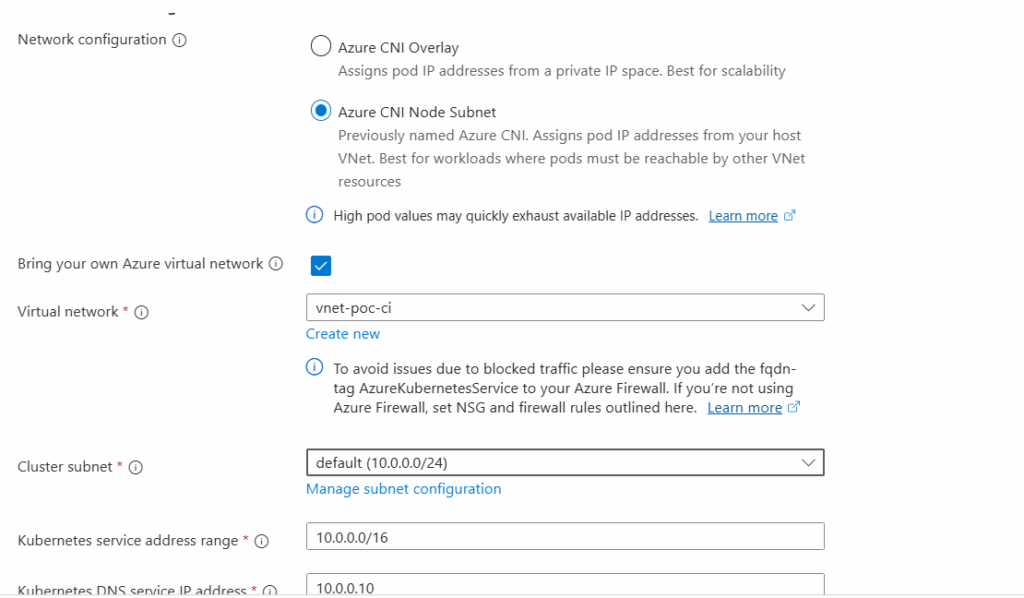
- Azure CNI Node Subnet: Can be deployed using Azure Portal, CLI and Terraform

Using Azure Portal:
Using CLI
#Connect-AzAccount

az login

# Get a list of available subscriptions.
az account list --output table


# If the subscription you are seeking is now in the list,
#   change your subscription.
az account set --subscription "Subscription Name"

# See what subscription you are currently using.
az account show

Get-AzSubscription

Select-AzSubscription -SubscriptionName "Subscription Name"

#Identify the subnet ID
az network vnet subnet list `
    --resource-group rg-vnet-poc-ci `
    --vnet-name vnet-poc-ci `
    --query "[2].id" --output tsv


# create the AKS cluster - Node Subnet
az aks create `
  --resource-group aks-poc `
  --name aks-cluster01 `
  --vnet-subnet-id "/subscriptions/ID/resourceGroups/rg-vnet-poc-ci/providers/Microsoft.Network/virtualNetworks/vnet-poc-ci/subnets/snet-aks-ci" `
  --node-vm-size "Standard_B2as_v2" `
  --dns-name-prefix "aks-dns-poc" `
  --tags "Owner=MAK" , "Stack=qa", "Billing=qa" `
  --node-osdisk-size "256" `
  --network-plugin azure `
  --dns-service-ip 172.26.42.12 `
  --service-cidr 172.26.42.0/24 `
  --enable-azure-rbac `
  --generate-ssh-keys `
  --location "CentralIndia" `
  --node-os-upgrade-channel  NodeImage `
  --enable-aad `
  --node-count 1 `
  --vm-set-type VirtualMachineScaleSets `
  --load-balancer-sku standard `
  --enable-cluster-autoscaler `
  --min-count 1 `
  --os-sku Ubuntu `
  --enable-azure-monitor-metrics `
  --max-count 2
2. Azure CNI Pod Subnet: Can be deployed using CLI and Terraform (Can’t deploy using Azure Portal)
Using CLI
#Connect-AzAccount

az login

# Get a list of available subscriptions.
az account list --output table

# If the subscription you are seeking is now in the list,
#   change your subscription.
az account set --subscription "Subscription Name"

# See what subscription you are currently using.
az account show

Get-AzSubscription

Select-AzSubscription -SubscriptionName "Subscription Name"

#Identify the subnet ID
az network vnet subnet list `
    --resource-group rg-vnet-poc-ci `
    --vnet-name vnet-poc-ci `
    --query "[2].id" --output tsv

# create the AKS cluster - Pod Subnet
az aks create \
  --resource-group rg-aks \
  --name aks-flat \
  --network-plugin azure \
  --network-mode transparent \
  --vnet-subnet-id /subscriptions/.../subnets/node-subnet \
  --pod-subnet-id /subscriptions/.../subnets/pod-subnet \
  --service-cidr 10.2.0.0/16 \
  --dns-service-ip 10.2.0.10

#The below parameter is related to Pod Subnet Deployment
--pod-subnet-id
3. Azure CNI Overlay: Can be deployed using Azure Portal, CLI and Terraform, for bring our own CIDR, we can only deploy using CLI and Terraform
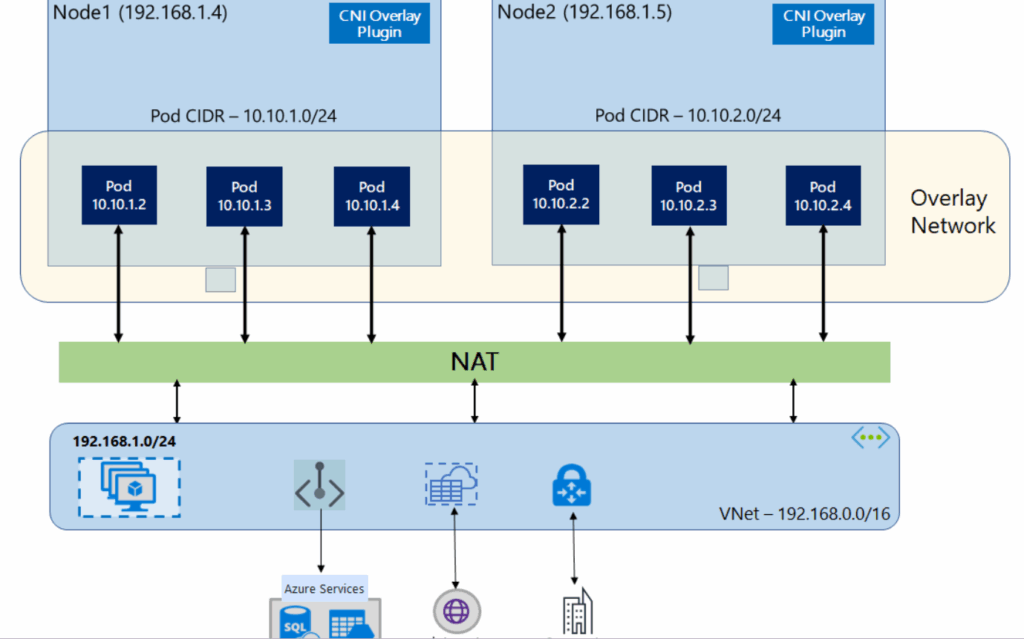
Using Portal without our own private Pod CIDR

Using CLI – Bring our own Pod CIDR
#Connect-AzAccount

az login

# Get a list of available subscriptions.
az account list --output table


# If the subscription you are seeking is now in the list,
#   change your subscription.
az account set --subscription "Subscription Name"

# See what subscription you are currently using.
az account show

Get-AzSubscription

Select-AzSubscription -SubscriptionName "Subscription Name"

#Identify the subnet ID
az network vnet subnet list `
    --resource-group rg-vnet-poc-ci `
    --vnet-name vnet-poc-ci `
    --query "[2].id" --output tsv


# create the AKS cluster - CNI Overlay
az aks create `
  --resource-group aks-poc `
  --name aks-ci01 `
  --vnet-subnet-id "/subscriptions/ID/resourceGroups/rg-vnet-poc-ci/providers/Microsoft.Network/virtualNetworks/vnet-poc-ci/subnets/snet-aks-ci" `
  --node-vm-size "Standard_D2ls_v5"`
  --tier standard `
  --dns-name-prefix "aks-dns-poc" `
  --tags "Owner=MAK" , "Stack=qa", "Billing=qa" `
  --node-osdisk-size "256" `
  --network-plugin-mode overlay `
  --pod-cidr 172.244.0.0/16 `
  --dns-service-ip 172.26.42.12 `
  --service-cidr 172.26.42.0/24 `
  --enable-azure-rbac `
  --generate-ssh-keys `
  --location "CentralIndia" `
  --node-os-upgrade-channel  NodeImage `
  --zones 1 2 3 `
  --enable-aad `
  --node-count 1 `
  --enable-private-cluster `
  --vm-set-type VirtualMachineScaleSets `
  --load-balancer-sku standard `
  --enable-cluster-autoscaler `
  --min-count 1 `
  --os-sku Ubuntu `
  --enable-azure-monitor-metrics `
  --max-count 2 `
  --enable-workload-identity `
  --enable-oidc-issuer `
  --network-plugin azure

#Additional
# Set max surge for a new node pool
az aks nodepool add --name mynodepool --resource-group MyResourceGroup --cluster-name MyManagedCluster --max-surge 33%

# Update max surge for an existing node pool
az aks nodepool update --name nodepool1 --resource-group aks-poc --cluster-name aks-cluster01 --max-surge 33%
Conclusion
Understanding how pod IPs are allocated, routed, and consumed in each model allows architects to avoid common pitfalls such as IP exhaustion, complex routing, and unexpected scaling limits. By aligning your AKS networking choice with your workload requirements and long-term growth strategy, you can build clusters that are both scalable and operationally efficient.
Find out More
My previous blogs on Kubernetes
- Azure AKS FailedScheduling – Kubernetes scheduler failure Insufficient CPU
- Kubectl Cheat Sheet – 41 Unique Kubernetes Commands Every Admin Should Know – Part 1
Related Information
- Configure Azure CNI Overlay networking in Azure Kubernetes Service (AKS)
- Azure Container Networking Interface (CNI) Pod Subnet
- Networking concepts for applications in Azure Kubernetes Service (AKS)
- AKS Legacy Container Networking Interfaces (CNI)
- Azure Kubernetes Service (AKS) CNI networking overview
I would like to thank you for the efforts you have put in writing this website.
I’m hoping to view the same high-grade content from you later on as well.
In truth, your creative writing abilities has motivated
me to get my own site now 😉
Thank you for your kind words. I truly appreciate you taking the time to share your feedback. I’m glad you found the content helpful and inspiring.
It’s great to hear that the articles motivated you to start your own site. Wishing you the very best with your blogging journey. Feel free to explore more articles on the site, and I hope they continue to provide value.
Thanks again for the encouragement!