
AKS Private Cluster: Create a Private Azure Kubernetes Service (AKS) Cluster – Part 1
You may also be interested in my other AKS-related blogs
- Azure AKS Networking Explained: Critical Differences Between Azure CNI Overlay vs Node Subnet vs Pod Subnet – Part 1
- Azure AKS FailedScheduling – Kubernetes scheduler failure Insufficient CPU
- Kubectl Cheat Sheet – 41 Unique Kubernetes Commands Every Admin Should Know – Part 1
About AKS Private Cluster
A private AKS cluster is a configuration where the control plane (API server) is assigned an internal IP address rather than a public one. The connection relies on the Azure Private Link service and a private endpoint located in your AKS cluster’s subnet
Create AKS Private Cluster Azure Managed DNS – Azure Portal

Create AKS Private Cluster Azure Managed DNS – Azure CLI
A few important points to note:
- If you need to enable Azure Container Registry on a private AKS cluster, set up a private link for the container registry in the cluster virtual network (VNet) or set up peering between the container registry’s virtual network and the private cluster’s virtual network.
- You can’t apply IP authorised ranges to the private API server endpoint – they only apply to the public API server. Refer to this link for more limitations here
#Connect-AzAccount
az account clear

az login --tenant <tenantid>

# Get a list of available subscriptions.
az account list --output table

# If the subscription you are seeking is now in the list,
#   change your subscription.
az account set --subscription "Visual Studio Enterprise Subscription"

# See what subscription you are currently using.
az account show

# Get the cluster Node Subnet ID

az network vnet subnet list `
    --resource-group rg-vnet-poc-ci `
    --vnet-name vnet-poc-ci `
    --query "[2].id" --output tsv


# Now create the AKS private cluster and enable the cluster autoscaler
#system will be the default value when configuring a private DNS zone, If we omit --private-dns-zone, AKS will create a private DNS zone in the node resource group i.e. MC_rg..
#If we set --private-dns-zone to none, AKS doesn't create a private DNS zone.
#For custom DNS please refer this link https://learn.microsoft.com/en-us/azure/aks/private-clusters

az aks create `
  --resource-group mak-aks-poc `
  --name mak-aks-ci01 `
  --vnet-subnet-id "/subscriptions/subid/resourceGroups/rg-vnet-poc-ci/providers/Microsoft.Network/virtualNetworks/vnet-poc-ci/subnets/snet-aks-ci" `
  --node-vm-size "Standard_D2ls_v5"`
  --tier standard `
  --dns-name-prefix "aks-dns-poc" `
  --tags "Owner=mak" , "Stack=qa", "Billing=qa" `
  --node-osdisk-size "256" `
  --network-plugin-mode overlay `
  --pod-cidr 172.244.0.0/16 `
  --dns-service-ip 172.26.42.12 `
  --service-cidr 172.26.42.0/24 `
  --enable-azure-rbac `
  --generate-ssh-keys `
  --location "CentralIndia" `
  --node-os-upgrade-channel  NodeImage `
  --zones 1 2 3 `
  --enable-aad `
  --node-count 1 `
  --enable-private-cluster `
  --vm-set-type VirtualMachineScaleSets `
  --load-balancer-sku standard `
  --enable-cluster-autoscaler `
  --min-count 1 `
  --os-sku Ubuntu `
  --enable-azure-monitor-metrics `
  --max-count 2 `
  --enable-workload-identity `
  --nodepool-name "systempool" `
  --enable-oidc-issuer `
  --network-plugin azure

#Add Usernodepool
az aks nodepool add --resource-group MyResourceGroup --cluster-name MyManagedCluster --name usernp1 --node-vm-size Standard_D2ls_v5 --os-type Linux --os-sku Ubuntu --node-count 2 --enable-cluster-autoscaler
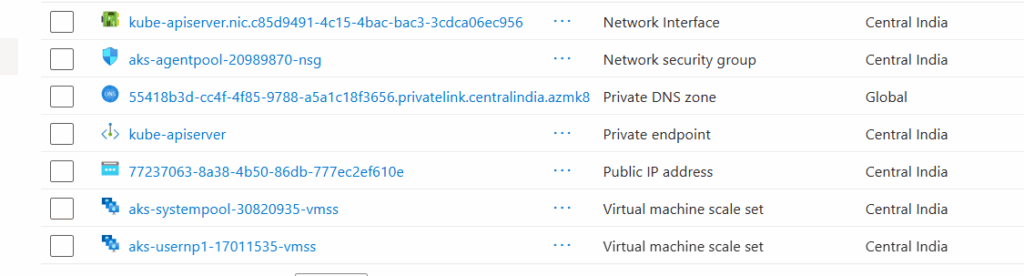
Post Checks – AKS Private Cluster Azure Managed DNS
- System will be the default value when configuring a private DNS zone. If you omit –private-dns-zone, AKS creates a private DNS zone in the node resource group i.e MC_RSG_ClusterName..
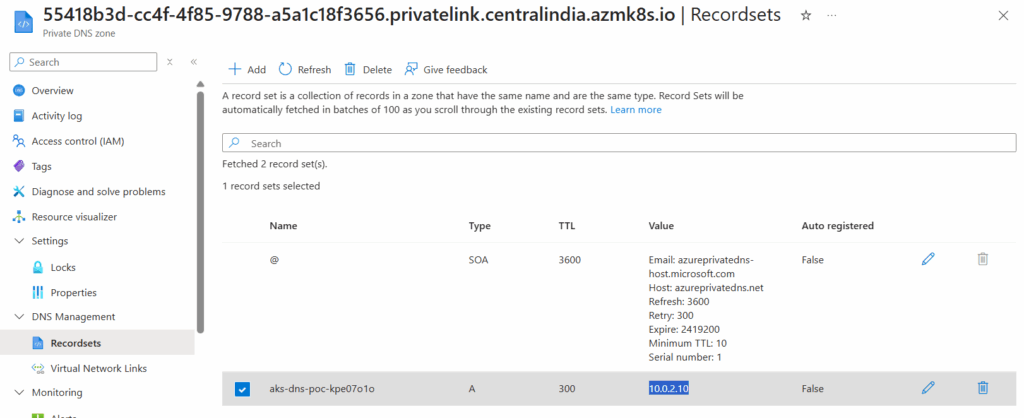
- The cluster uses an A record in the private zone to resolve the IP of the private endpoint for communication to the API server.
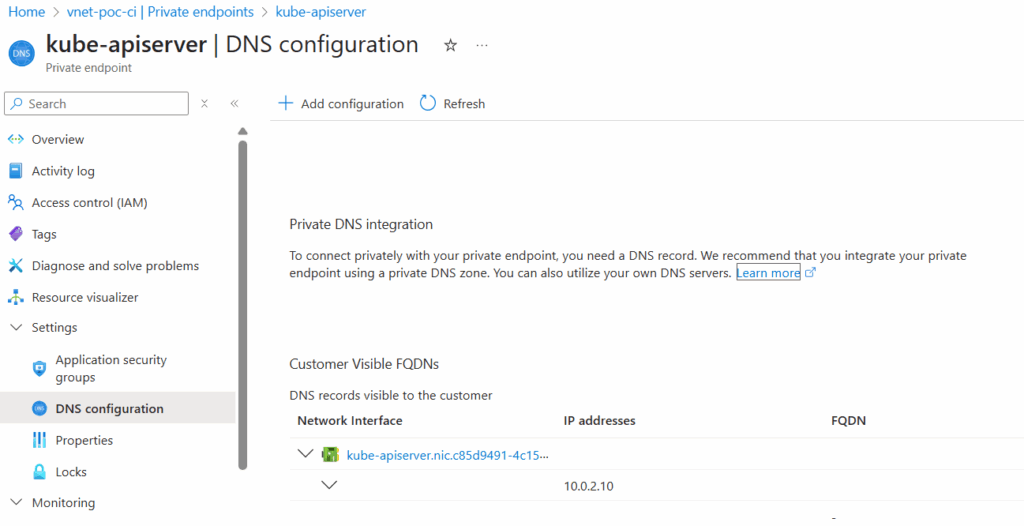
- If you go to AKS VNET and select the “Private Enpoints” you see the private endpoint private IP address the API host A records was pointing

Connect AKS Private Cluster Azure Managed DNS – Cloud Shell
Configure Cloud Shell to connect to Private AKS cluster using Azure POrtal (preview)
- This option creates a separate VNet with the necessary resources for Cloud Shell and configures VNet peering for you with AKS deployed Vnet.
- Configuration takes at least 5 to 10 minutes, followed by a few additional minutes to connect to the cluster.
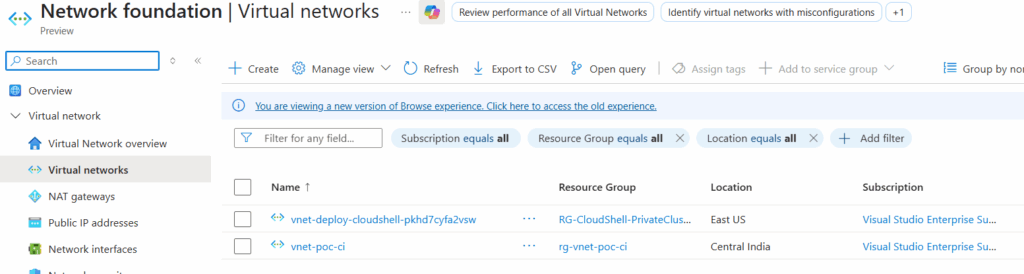
- Click “Configure,” and the remaining steps will proceed automatically.
- After successful configuration, the “Configure” button will be greyed out. Then, click “Cloud Shell” to open the Cloud Shell.


