
Istio in AKS Deployment: Ingress vs Gateway API, Managed vs Azure Self-Managed -Part 1
Istio in AKS Deployment: Ingress vs Gateway API & Azure Self-Manged
Table of Contents
This PART – 1 Covers Following Topics..
- Difference between Ingress and Gateway API
- What is istio and it’s use cases
- Difference between self managed istio vs managed managed istio
- Difference between Application gateway ingress vs application gateway for containers vs istio
- Google Cloud provided istio
The PART – 2 Will Soon Be Covering Following Topics..
- Deployment of self managed istio
- Deployment of microsoft managed istio
- Deploy Istio-based service mesh add-on for Azure Kubernetes Service
- Configure Static Egress Gateway in Azure Kubernetes Service (AKS)
- Deploy ingress gateways for Istio service mesh add-on for Azure Kubernetes Service
- Deploy egress gateways for Istio service mesh add-on for Azure Kubernetes Service
It has become increasingly challenging to understand the critical differences and appropriate use cases among the various service mesh and ingress solutions available, particularly in cloud-native environments i.e Istio in AKS. This confusion often centers on offerings such as:
- Istio Standalone:Self-managed, open-source Istio offers maximum control and customization via its control plane and Envoy proxy data plane, enabling advanced traffic management (canary rollouts, circuit breaking), security (mTLS), and observability. However, it requires significant operational overhead, maintenance, and deep Kubernetes/Istio expertise
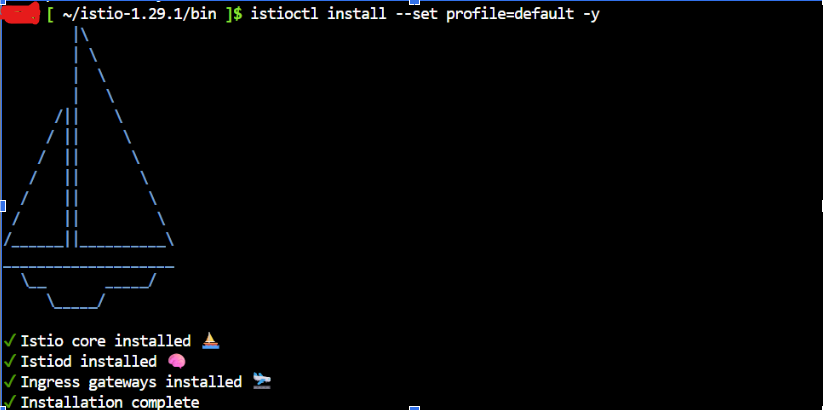
- Microsoft-Provided Managed Istio (e.g., within AKS add-ons): A cloud provider-managed Istio reduces operational complexity by handling the control plane. This streamlines using core Istio features (traffic routing, security, telemetry) without managing components. However, it may offer fewer features or slower updates than a standalone version, as the provider dictates the lifecycle.

- Application Gateway Ingress Controller (AGIC): The Application Gateway Ingress Controller (AGIC) acts as an Ingress controller, routing North-South (external) HTTP/HTTPS traffic to the cluster. It excels at perimeter security, SSL termination, and basic load balancing. However, while simpler than a service mesh, it lacks the advanced East-West (service-to-service) traffic control, security, and observability features of tools like Istio.
- Application Gateway for Containers : Application Gateway for Containers is the evolution of the Application Gateway Ingress Controller (AGIC), a Kubernetes application that enables Azure Kubernetes Service (AKS) customers to use Azure’s native Application Gateway application load-balancer. In its current form, AGIC monitors a subset of Kubernetes Resources for changes and applies them to the Application Gateway, utilizing Azure Resource Manager (ARM).

1. Difference Between Ingress and Gateway API
Gateway API:
The Gateway API provides a collection of Kubernetes resources designed for configuring a gateway proxy. This proxy is used to route external cluster traffic to your services. A key advantage is that the target services can be standard ClusterIP Services, much like with Ingress, without needing to be of the NodePort or LoadBalancer type.
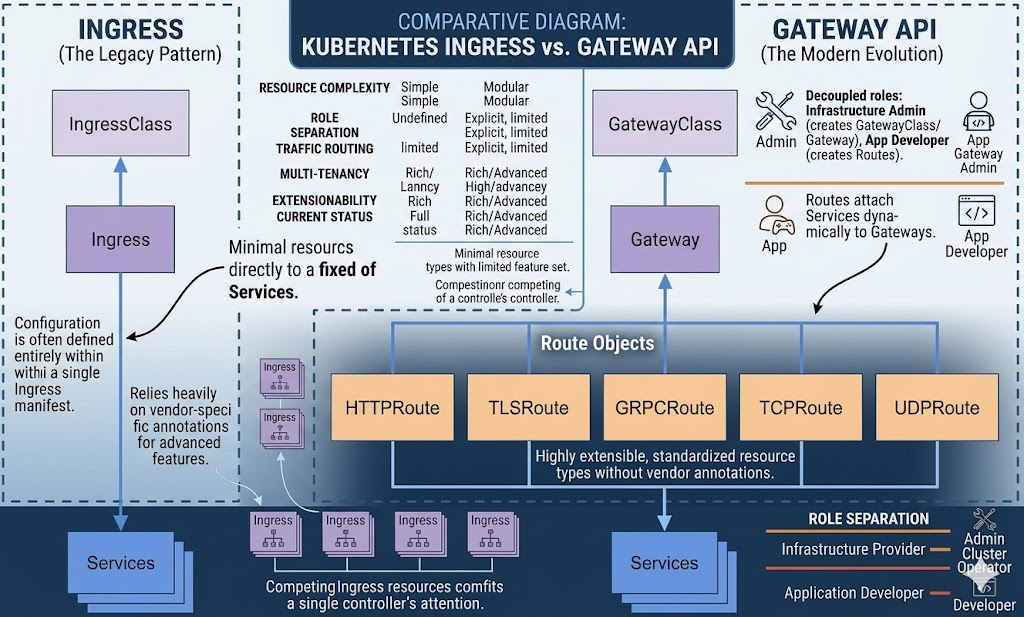
Few Key Differences:
| Feature | Ingress API | Gateway API (The Modern Evolution) |
| Architecture | Single-tier hierarchy. A single object points directly to a fixed set of Services. | Multi-tier, modular hierarchy. Responsibilities are split between Gateway and Route objects. |
| Resource Management | Monolithic. All host headers, paths, and annotations are packed into one large, complex manifest. | Decoupled. The Gateway object stays small while routing rules are extracted into separate, manageable Route objects. |
| Protocol Support | Limited. Natively supports only HTTP traffic. | Extensive. Standardized support for HTTP, TLS, gRPC, TCP, and UDP. |
| Multi-tenancy | Namespace-restricted. Usually lives in and references services within a single namespace. | Cross-namespace. A single Gateway can be shared across namespaces, allowing one Public IP to serve the entire cluster. |
| Role Separation | Combined. Often forces cluster admins and developers to manage the same object. | Separated. Allows admins to manage infrastructure (Gateways) while developers manage application routing (Routes). |
2. What is istio and it’s use cases:
Istio is an open-source service mesh initially developed by Lyft, Google, and IBM. It now benefits from a vibrant, diverse community that includes contributors from Red Hat, VMWare, Solo.io, Aspen Mesh, Salesforce, and many others.
Istio enables the creation of reliable, secure, cloud-native systems. It address complex challenges such as security, policy management, and observability, often without requiring changes to the application code.
The core of Istio’s data plane consists of service proxies, based on the Envoy proxy. These proxies sit alongside the applications, acting as intermediaries. They implement networking behavior based on the configuration they receive from the control plane.
Istio addresses the challenges developers and operators face with a distributed or microservices architecture. The Istio-based service mesh add-on provides an officially supported and tested integration for Azure Kubernetes Service (AKS).
A service mesh streamlines communication among microservices. It empowers operations teams to enhance observability, traffic management, and security for these services without requiring changes to the underlying code.
3. Difference Between Self Managed istio vs Microsoft Manged istio
| Feature | OSS Istio | AKS Add-on |
| Installation | Manual (istioctl) | Azure-managed |
| Upgrades | You handle | Azure handles |
| Integration | Generic Kubernetes | Native Azure |
| Observability | Manual setup | Azure Monitor integrated |
| Security | Manual mTLS setup | Simplified |
| Support | Community | Microsoft support |
| Control Plane | Runs on your Nodes | Managed by Azure |
| WAF Support | No (requires extra work) | No |
| Sidecars? | Yes | Yes |
| Resource Usage | High (uses your RAM) | Moderate |
4. Difference Between Application Gateway Ingress vs Application Gateway for Containers vs istio
| Feature | Istio | AGIC (Standard) | AGC (Modern) |
| Service Mesh | Yes | No | No |
| Ingress | Yes (via gateway) | Yes | Yes (via Gateway API) |
| mTLS | Yes | No | No |
| Canary / A-B | Yes | No | Yes (via HTTPRoute Weights) |
| East-West traffic | Yes | No | No |
| Azure native | Partial | Full | Full |
| Kubernetes API | Custom (VirtualService) or Gateway API | Ingress | Gateway API (HTTPRoute) |
| Update Speed | Fast (Seconds) | Minutes (Slow) | Seconds (Real-time) |
| Deployment Model | Add-on pod (on-cluster) | Helm chart / Add-on pod | Managed Azure Service |
| Capacity | Scaling Pods (uses your nodes) | Fixed by Gateway SKU | Dynamic (up to 300k RPS) |
| Traffic Routing | Advanced (Header, Weights, Filters) | Basic (Host/Path) | Advanced (Header-based, Weights, Filters) |
5. Enabling Gateway API in Google Kubernetes Engine
If you use GKE, you don’t need to install Istio. Instead, you must enable Gateway API support with the following command:
$ gcloud container clusters update <cluster-name> --gateway-api=standard --region=<region>You may also be interested in my other AKS-related blogs